Sunday, 22 March 2015

IT Essentials v5.0 Chapter 8 Exam Answers


1
What is a good source for safely downloading Android apps?
the Apple App Store
iTunes
freeware sites
Google Play*
2
What two functions can be performed with the home button on an iOS mobile device? (Choose two.)
lock the device
the same functions as the Android navigation buttons*
start voice control*
reset the device to the factory default
start the TouchFLO interface
3
What are two potential user benefits of rooting or jailbreaking a mobile device? (Choose two.)
A custom OS may reduce sandboxing features.
The operating system can be fine-tuned to improve the speed of the device.*
The operation of the carrier cellular network may be affected.
The user interface can be extensively customized.*
The root directory of the device is blocked.
4
What are two purposes of the passcode lock feature on mobile devices? (Choose two.)
to erase all personal data from the device
to remotely lock the device if it is stolen
to return the device to the default factory state
to place the device into a power saving state*
to restore and re-synchronize the device
to help prevent theft of private information*
5
What is an advantage of using flash memory to store data in mobile devices?
Flash memory has a drive head that moves, reducing the seek time to locate data.
Flash memory requires very little power to store and retrieve data.*
Flash memory is not affected by ESD.
Flash memory is highly resistant to water and cold.
6
What are two touchscreen characteristics that are used by most mobile devices? (Choose two.)
an electrical field of the screen that is interrupted when the user touches the screen*
three layers responsible for conducting electricity with a small air gap between them
a glass screen that is coated with a capacitor
two transparent layers of material capable of conducting electricity*
two colored layers of material capable of conducting electricity
7
Which component is field-replaceable in most mobile devices?
memory card*
RAM
touchscreen
CPU
8
Which mobile device troubleshooting procedure is correct?
When a problem appears with a mobile device, the owner should analyze if it is cost-effective to fix it.*
Mobile devices change so rapidly in design and functionality it is always better to replace the device rather than repair it.
Mobile device problems always result in sending the device to the manufacturer for troubleshooting.
Every time a mobile devices freezes, the owner can reinitialize it by pressing the reset button.
9
A user accidentally drops a mobile device into a pool. What corrective action should be taken?
Contact the manufacturer for repair or replacement.*
Use a hair dryer to dry the phone.
Open the device and replaced damaged components.
If the mobile device does not turn on, throw it away and buy a new one.
10
After being left in a car for many hours on a hot day, an iPhone cannot be turned on. What should the user do to fix this problem?
Buy a new power button and replace it.
Disassemble the phone and look for heat related damage.
Return the phone to the manufacturer for repair.*
Place the phone in a refrigerated space and allow the unit to cool down.
11
After an upgrade to a mobile device, some applications are no longer working, but some work fine. The user can make calls and send and receive email. Which two kinds of problems could be related to these issues? (Choose two.)
a software problem*
a touchscreen problem
a cell service problem
a circuit board problem
a memory problem*
12
Which scenario or situation would prevent a user from upgrading the OS on an Android device?
The software copyright was not obtained before the installation.
The correct patches were not installed.
The hardware does not meet specifications.*
Permission was not obtained from the manufacturer.
13
Which two conditions must be met for mobile device security measures such as remote lock and remote wipe to function? (Choose two.)
The GPS locator must be enabled.
The passcode must be disabled.
Sandboxing must be enabled.
The device must be powered on.*
The device must be connected to a network.*
14
Which two items common to both Android and iOS devices can be remotely backed up? (Choose two.)
photos
settings
contacts*
calendar*
messages
15
Which statement is true about wireless connectivity on an Android mobile device?
If the network SSID is not being broadcast, the device will not be able to connect to the network.
When the device roams out of the range of any Wi-Fi networks, it can connect to the cellular data network if this feature is enabled.*
The Android OS does not support wireless connectivity that uses WPA2 security.
If a Wi-Fi network is secured with a password, the network must be manually configured on the device.
16
This is a flash item. Please click below to answer this item.
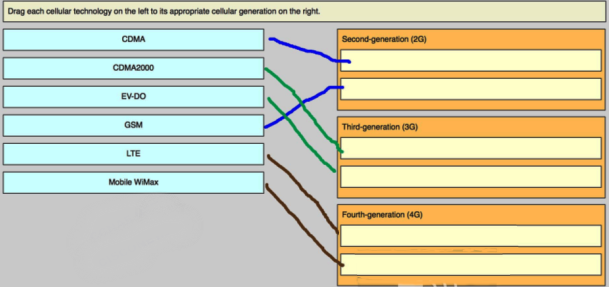
17
In the context of mobile devices, what does the term tethering involve?
connecting a mobile device to a USB port on a computer in order to charge the mobile device
connecting a mobile device to a hands-free headset
connecting a mobile device to another mobile device or computer to share a network connection*
connecting a mobile device to a 4G cellular network
18
Which statement is true about industry standards for cellular networks?
First generation cellular standards are mostly digital standards.
Third generation cellular standards require a maximum of 1 Gb/s for devices moving slowly, such as when a user has a mobile device and is walking.
Cellular standards have made it more difficult and expensive to make calls to people that are on a different network.
Cell phones that use a single standard can often only be used in specific geographic areas.*
19
Which statement about synchronizing a mobile device to a PC is true?
To synchronize data on an iOS device, iTunes must be installed on the PC.*
Motocast USB can be used to synchronize data when using an iOS device.
iOS synchronization can only be performed over a USB connection.
Data on Android devices cannot be synchronized with a PC.
20
A technician is configuring email on a mobile device. The user wants to be able to keep the original email on the server, organize it into folders, and synchronize the folders between the mobile device and the server. Which email protocol should the technician use?
MIME
POP3
SMTP
IMAP*
21
Which mobile device security feature requires the user to slide a finger over the screen in a specific sequence to unlock the device?
simple passcode
pattern*
remote wipe
slide
22
Which term describes the ability of a mobile device to recognize when two or more points of contact are made on the screen?
large touch
many touch
multitouch*
long touch

IT Essentials v5.0 Chapter 7 Exam Answers


1
Which two statements are true of a laptop CPU when compared to a desktop CPU? (Choose two.)
The laptops consume more power.
The laptop CPUs are interchangeable with desktop CPUs.
The laptops are designed to produce less heat.*
The laptops operate at higher clock speeds.
The laptops use smaller cooling devices.*
2
In the power management settings, which two devices can be set to turn off to conserve battery power? (Choose two.)
cooling fans
memory
hard disk drive*
display*
CPU
3
What is the first step in the process of troubleshooting a laptop?
Verify full functionality.
Determine the exact cause.
Establish probable causes.
Identify the problem.*
4
What is the final task for a technician after troubleshooting a laptop?
Verify full functionality.
Correct the problem.
Document the problem and the solution.*
Implement preventive measures.
5
What can a user do to reconnect a laptop to a functioning wireless network after a laptop has been moved and the connection has been lost?
Reboot the operating system.
Plug in the power cord to the wall outlet.
Recharge the battery.
Change the orientation of the laptop.*
6
Why are SODIMMs well suited for laptops?
They do not produce heat.
They have a small form factor.*
They are interchangeable with desktops.
They connect to external ports.
7
An administrator tries to configure Power Options within Windows, but is unable to do so. What is the possible cause?
Thermal management has been enabled.
ACPI has not been enabled in the BIOS.*
The administrator does not have user privileges to change the settings.
Wake-On-LAN has been enabled.
8
A technician is trying to remove a SODIMM module from a laptop. What is the correct way to do this?
Pull outward by holding the center of the SODIMM module.
Apply downward force on the SODIMM module.
Press outward on the clips that hold the sides of the SODIMM.*
Desolder the SODIMM module.
9
What should a technician do prior to replacing a keyboard on a laptop?
Remove all sources of power from the laptop.*
Remove the LCD screen.
Remove the outer casing of the laptop.
Remove the power inverter.
10
Which two internal expansion slots in laptops are commonly used to install wireless adapter cards? (Choose two.)
ISA
PCIe
Mini-PCIe*
PCI
PCI Express Micro*
11
What is the next step in the troubleshooting process after a solution has been implemented on a laptop?
Return the device to the customer.
Verify the solution.*
Document the solution.
Ask the customer to explain the problem.
12
A technician notices that a laptop display appears stretched and pixelated. What is a probable cause of this?
The power inverter is failing.
The display properties are incorrectly set.*
The screen has been burned in.
The power management features are incorrectly set.
One of the RAM modules is failing.
13
Which statement is true about laptops?
Most of the internal components that are designed for laptops cannot be used for desktops.*
Laptop CPUs do not use cooling devices.
Laptops use fewer components than desktops use.
Laptop motherboards have standard form factors.
14
What is a definition for CPU throttling?
overclocking
upgrading the CPU without changing the motherboard
the sharing of processing between two or more cores
the ability to modify CPU clock speed as needed*
15
What is the purpose of the eject button on a laptop docking station?
to open the CD/DVD tray
to detach the laptop from the docking station*
to disconnect a USB device
to remove the laptop battery
16
Which key sequence may be used to control whether the content of the screen will be presented on a built-in display or on an external display?
Fn + *
Shift +
Ctrl +
Alt +
17
What would be the most effective preventive maintenance routine for company laptops that are subject to high use?
a reactive routine that is performed monthly
a proactive routine that is performed monthly and as needed*
a proactive routine that is performed every six months
a reactive routine that is performed only as needed
18
To clean laptops, which two products are recommended? (Choose two.)
car wax
rubbing alcohol
cotton swabs*
ammonia
mild cleaning solution*
19
A technician has been asked to decide which laptop components should be cleaned on a monthly basis as part of a maintenance routine. What are two examples of components that should be included? (Choose two.)
CPU
hard disk platters and heads
exterior case*
keyboard*
RAM
20
A technician has installed a wireless Ethernet card in a Windows 7 laptop. Where would the technician configure a new wireless connection?
Control Panel > Networking and Sharing Center > Set up a new connection or network*
Control Panel > System > Device Manager
Control Panel > Administrative Tools > Services
Control Panel > Internet Options
21
Which component or components would be interchangeable between a laptop and and a desktop PC?
CPU
peripheral devices*
motherboard
power supply
22
A user needs to connect a Bluetooth device to a laptop. Which type of cable is needed to accomplish this?
USB cable
EIA/TIA 232 cable
None. Bluetooth connections are wireless.*
parallel cable
VGA cable

Sunday, 15 February 2015

Cisco IT Essentials v5.0 Chapter - 1

Correct answers are in Red color.

1. Which type of memory is primarily used as cache memory?
  • DRAM
  • RAM
  • ROM
  • SRAM
2. Which two considerations would be of the greatest importance when building a workstation that will run multiple virtual machines? (Choose two.)
  • High-end sound card
  • Number of CPU cores
  • Water cooling
  • Powerful video card
  • Amount of RAM
3. Which two devices are considered input devices? (Choose two.)
  • Digital camera
  • Printer
  • Speakers
  • Biometric authentication device
  • Projector
4. Which three devices are considered output devices? (Choose three.)
  • Headphones
  • Keyboard
  • Fingerprint scanner
  • Monitor
  • Mouse
  • Printer
5. A user playing a game on a gaming PC with a standard EIDE 5400 RPM hard drive finds the performance unsatisfactory. Which hard drive upgrade would improve performance while providing more reliability and using less power?
  • A 7200 RPM SATA hard drive
  • A 7200 RPM EIDE hard drive
  • An SSD
  • A 10,000 RPM SATA hard drive
6. Which hardware upgrade would allow the processor in a gaming PC to provide the optimal gaming performance?
  • A fast EIDE drive
  • Large amounts of fast RAM
  • Liquid cooling
  • A high capacity external hard drive
7. Which two storage devices use a magnetic medium for storing data? (Choose two.)
  • tape drive
  • Solid state drive
  • Hard disk drive
  • Compact disk drive
  • Blue-ray disk drive
8.

Refer to the exhibit. Which type of adapter is shown?
  • Network interface
  • Sound
  • Video
  • RAID
9. Which component controls the communications and interactions between the CPU and other components on the motherboard?
  • RAM
  • CMOS
  • Chipset
  • BIOS
10 Which two pieces of information are needed before selecting a power supply? (Choose two.)
  • The total wattage of all components
  • The voltage requirements of peripheral devices
  • The form factor of the case
  • The type of CPU
  • The installed operating system
11. Which memory module has a front side bus speed of 200 MHz?
  • DDR3-667
  • PC100 SDRAM
  • DDR-400
  • DDR-333
12. What are two factors that must be considered when choosing a computer case? (Choose two.)
  • The number of LED indicators at the front of the case
  • The size of the motherboard and the power supply
  • The vendor that manufactured the motherboard
  • The size of the monitor
  • The number of internal drive locations
13. This is a flash item. Please click below to answer this item.

14. Which unit of measurement is used to indicate the hard drive speed?
  • Pages per minute
  • Gigabytes
  • Revolutions per minute
  • Clusters per minute
15. Refer to the exhibit. Which type of video card expansion slot is depicted?
  • PCIe
  • ISA
  • PCI
  • AGP
16. What type of connector can be used to connect an eSATA interface to an external SATA drive?
  • 7-pin connector
  • 9-pin connector
  • 15-pin connector
  • 5-pin connector
17. Where can the input voltage selection be changed from 110 volts to 220 volts on a computer system?
  • On the motherboard
  • In the BIOS
  • On the back of the power supply
  • In the operating system control panel
18.

Refer to the exhibit. Which type of cable is shown in the graphic?
  • USB
  • Parallel
  • FireWire
  • Serial
20. Which two activities are normally controlled by the Northbridge part of the chipset? (Choose two.)
  • Communication between the CPU and the sound card
  • Communication between the CPU and the hard drive
  • Access to the RAM
  • Communication between the CPU and the I/O ports
  • Access to the video card
21. A technician looks at a motherboard and sees a 24-pin connector. What component would connect to the motherboard through the use of this 24-pin connector?
  • Power supply
  • SATA drive
  • Video card
  • PATA optical drive
  • Floppy drive

Cisco IT Essentials v5.0 Chapter - 2

Correct answers are in Red color.

1. Which tool in Windows XP gives a technician access to initialize disks and create partitions?
  • Defrag
  • Scandisk
  • Format
  • Disk Management
  • Disk Cleanup
2. Which Windows XP command-line utility scans the critical files of the operating system and replaces any files that have been corrupted?
  • System File Checker
  • Disk Cleanup
  • Scan System
  • Defrag
  • Disk Management
  • Chkdsk
3. Which two types of tools can help protect a computer from malicious attacks? (Choose two.)
  • Disk Management
  • Spyware Remover
  • Antivirus software
  • Disk Cleanup
  • Scandisk
  • Fdisk
4. A technician wants to limit the chances of ESD affecting the workspace. Which three precautions should be taken? (Choose three.)
  • Ensure antistatic mats are on the workbench and floor.
  • Keep humidity in the environment very low.
  • Ensure that all flooring is carpeted.
  • Wear an antistatic wrist strap.
  • Keep all components in antistatic bags.
  • Store all computer components in clear plastic bags.
5 .What are two significant sources of EMI? (Choose two.)
  • Infrared mice
  • Electrical storms
  • RAM modules
  • Power lines
  • LCD monitors
6. Which precaution should be taken when working inside computer systems?
  • Avoid using magnetized tools.
  • Wear ESD protection to repair monitors in humid environments.
  • Leave the power cord attached to an outlet for grounding.
  • Avoid using ESD wrist straps and ESD mats simultaneously.
7. Which cleaning solution is recommended to clean the contacts of computer components?
  • Isopropyl alcohol
  • Glass cleaner with ammonia
  • Water that is mixed with a small amount of dishwashing liquid
  • Rubbing alcohol
8. Why should a pencil never be used as a tool when working inside a computer?
  • Pencil lead is conductive.
  • The lead in a pencil can induce current.
  • A pencil can hold a static charge.
  • Pencil lead is corrosive.
9. The performance of a computer is reduced after using the Internet. Which three tools could be run to try to improve the performance of the computer? (Choose three.)
  • Fdisk
  • A BIOS updater
  • Spyware remover
  • Defrag
  • Disk Cleanup
  • Device Manager
10. Why is documentation of all services and repairs an important organizational tool for a technician?
  • It allows the public sharing of information on the Internet.
  • It increases the cost of services and repairs.
  • It reduces the technical skills required of new technicians.
  • It provides reference material for similar problems when they are encountered in the future.
11. How does an inline UPS protect computer equipment against electrical power brownouts and blackouts?
  • By stopping the flow of voltage to the computer
  • By grounding excess electrical voltage
  • By switching from main power to a standby power source
  • By using a battery to supply a constant level of voltage
12. Which two actions pose a potential safety hazard to a technician? (Choose two.)
  • Standing on an antistatic mat while working on a computer
  • Plugging a printer into an UPS
  • Using a magnetic screwdriver while working on a hard drive
  • Cleaning the inside of the computer while it is turned on
  • Wearing a wrist strap while working inside a power supply
13. Which circumstance increases the likelihood of ESD damage to a computer?
  • Self grounding against the computer case
  • Using a magnetic screwdriver while working on a hard drive
  • Plugging a printer into an UPS
  • Working in low levels of humidity
14. Which tool is designed to loosen or tighten crosshead screws?
  • Torx driver
  • Phillips screwdriver
  • Flat head screwdriver
  • Hex driver
15. Which tool could potentially cause data loss on hard disk or floppy drives?
  • Compressed air
  • A magnetic screwdriver
  • A lead pencil
  • A computer vacuum cleaner
16. Which condition refers to a reduced voltage level of AC power that lasts for an extended period of time?
  • Sag
  • Spike
  • Surge
  • Brownout
17. A technician accidentally spills a cleaning solution on the floor of the workshop. Where would the technician find instructions on how to properly clean up and dispose of the product?
  • The local hazardous materials team
  • The insurance policy of the company
  • The material safety data sheet
  • The regulations provided by the local occupational health and safety administration
18. Which two devices commonly affect wireless networks? (Choose two.)
  • Microwaves
  • Cordless phones
  • External hard drives
  • Home theaters
  • Blu-ray players
  • Incandescent light bulbs
19. What is a proper directive for using a can of compressed air to clean a PC?
  • Use a long, steady stream of air from the can.
  • Do not spray the compressed air with the can upside down.
  • Do not use compressed air to clean a CPU fan.
  • Spray the CPU cooling fan with the compressed air to verify that the fan blade is spinning freely.
20. Which type of fastener is loosened and tightened with a hex driver?
  • Six sided bolt
  • Cross head screw
  • Slotted screw
  • Torx bolt

Cisco IT Essentials v5.0 Chapter - 3

Correct answers are in Red color.

1. A technician has just finished assembling a new computer. When the computer is powered up for the first time, the POST discovers a problem. How does the POST indicate the error?
  • It issues a number of short beeps.
  • The LED on the front of the computer case flashes a number of times.
  • It locks the keyboard.
  • It places an error message in the BIOS.
2. A technician is troubleshooting a PC that will not boot. When the PC is powered on, it emits a series of beeps and indicates that the BIOS settings have changed and need to be reconfigured. The technician reconfigures the BIOS settings, saves them, and the computer boots. Later when the PC is powered off and back on again, the same error message appears, and all the BIOS changes are gone. What should the technician do to fix the problem?
  • Reseat the RAM.
  • Replace the motherboard.
  • Upgrade the BIOS firmware.
  • Replace the CMOS battery.
3. What type of connector would be used to supply power to an PATA optical drive?
  • PS/2
  • AT
  • Berg
  • Molex
4. What is the best way to apply thermal compound when reseating a CPU?
  • Put a thick layer of thermal compound over the existing thermal compound before reseating the CPU.
  • Clean the CPU and the base of the heat sink with isopropyl alcohol before applying the thermal compound.
  • Scrape off the old thermal compound on the heat sink with a sharp knife and apply the thermal compound liberally.
  • Change the base of the heat sink before applying the thermal compound.
  • Use rubbing alcohol to clean the base of the heat sink before applying thermal compound.
5. A technician has assembled a new computer and must now configure the BIOS. At which point must a key be pressed to start the BIOS setup program?
  • After the POST, but before Windows starts to load
  • During the Windows load process
  • Before the computer is powered on
  • During the POST
6. What is a function of the BIOS?
  • Provides graphic capabilities for games and applications
  • Enables a computer to connect to a network
  • Performs a power-on self test of internal components
  • Provides temporary data storage for the CPU
7. A technician has just finished assembling a new computer. When the computer is powered up for the first time, the POST discovers a video subsystem problem. How does the POST indicate the error?
  • By issuing a number of beeps
  • By flashing the LED on the front of the computer case a number of times
  • By locking the keyboard
  • By placing an error message in the BIOS
8. You are monitoring a new technician who is installing a device driver on a Windows-based PC. The technician asks why the company requires the use of signed drivers. What would be the best response to give?
  • A signed driver has been approved by the company that created the device driver.
  • A signed driver has passed the lab test of Microsoft for quality and helps prevent a system from being compromised.
  • An unsigned driver can cause files to be fragmented as they are processed.
  • Signed drivers prevent physical damage to devices.
  • All companies making devices for a Windows computer have to have Microsoft sign off on the new driver before it can be added to the operating system.
9. What is an important step when installing a second PATA hard drive in a computer?
  • Set the drive ID number with the correct jumper.
  • Ensure that pin one of the PATA data cable is correctly aligned with the connector.
  • Configure the BIOS settings to auto-detect the master drive.
  • Set the swap file size on the new drive.
10. What number of disks is the required minimum to implement RAID 0?
  • 2
  • 1
  • 3
  • 4
11. A technician is assembling a new computer. Which two components are often easier to install before mounting the motherboard in the case? (Choose two.)
  • Sound card
  • Video card
  • CPU
  • NIC
  • Memory
12. A technician is troubleshooting a computer that has a malfunctioning floppy drive. The technician observes that the floppy drive light remains lit constantly. What should the technician do to repair the problem?
  • Connect the data cable making sure that the colored stripe on the cable is aligned with pin 1 on the drive and the motherboard.
  • Remove the floppy drive via Add/Remove Hardware.
  • Change the jumper setting to master for the floppy drive.
  • Replace the floppy drive.
13. A technician is installing additional memory in a computer. How can the technician guarantee that the memory is correctly aligned?
  • The label on the memory module should always face the CPU.
  • The arrows on the memory module should be aligned with the arrows on the motherboard slot.
  • A notch in the memory module should be aligned with a notch in the memory slot.
  • Memory slots are color coded, with one end red and one end blue.
14. What is used to prevent the motherboard from touching metal portions of the computer case?
  • ZIF sockets
  • An I/O shield
  • Thermal compound
  • Standoffs
15. What is an advantage of using signed drivers?
  • They never need upgrading.
  • They are verified to be compatible with the operating system.
  • They are guaranteed by the manufacturer to work with any hardware.
  • They are guaranteed to work with all operating systems.
  • They are free of errors.
16. Where is the saved BIOS configuration data stored?
  • Hard drive
  • Cache
  • CMOS
  • RAM
17. Which statement describes the purpose of an I/O connector plate?
  • It makes the I/O ports of the motherboard available for connection in a variety of computer cases.
  • It provides multiple connections for SATA hard drives to connect to the motherboard.
  • It plugs into the motherboard and expands the number of available slots for adapter cards.
  • It connects the PCIe adapter slots used for video directly to the CPU for faster processing.
18. What are two examples of settings that can be changed in the CMOS settings? (Choose two.)
  • Swap file size
  • Boot order
  • Enabling and disabling devices
  • Device drivers
  • Drive partition size
19. A technician discovers that the PS/2 mouse port is not working. The technician has several replacement mouse models available. What input port will the technician use to install the replacement mouse?
  • Parallel
  • USB
  • FireWire
  • eSATA
20. What are three important considerations when installing a CPU on a motherboard? (Choose three.)
  • The CPU heat sink and fan assembly are correctly installed.
  • The CPU is correctly aligned and placed in the socket.
  • The CMOS EPROM battery is removed prior to installing the CPU.
  • Antistatic precautions are taken.
  • The CPU contacts are first cleaned with isopropyl alcohol.
  • Maximum insertion force is applied to the load lever so the CPU is locked in place.
21. A technician has been asked to install a second optical drive in a computer. The technician will need to configure the drive as slave. How can the technician accomplish this desired configuration?
  • Use jumpers on the drive to configure the drive as slave.
  • Use jumpers on the motherboard to configure the drive as slave.
  • List the drive as slave in the CMOS.
  • Connect the drive after the twist in the PATA cable.

Cisco IT Essentials v5.0 Chapter - 4

Correct answers are in Red color.

1. Which task should be part of a software maintenance routine?
  • Check for and secure any loose cables.
  • Remove dust from the power supply.
  • Defragment the hard drive.
  • Back up the data, reformat the hard drive, and reinstall the data.
2. What is the purpose of documenting the information that is obtained from the customer in the work order?
  • To create a centralized database of possible problems
  • To use the information for marketing purposes
  • To keep track of parts that are ordered
  • To use the information to aid in solving the problem
3. What is a recommended procedure to follow when cleaning computer components?
  • Blow compressed air on cooling fans so that they will spin when dust is being removed.
  • Hold cans of compressed air upright while spraying.
  • Use window cleaner on LCD screens.
  • Remove the CPU before cleaning.
4. After a technician tests a theory of probable causes, what two actions should the technician take if the testing did not identify an exact cause? (Choose two.)
  • Establish a new theory of probable causes.
  • Document each test tried that did not correct the problem.
  • Test all remaining possible causes starting with the most complex.
  • Use a top down approach to isolate the cause of the problem.
  • Randomly replace components one at a time until the problem is solved.
5. Which device is most likely to be affected by an incorrect setting saved in CMOS or an incorrect jumper setting?
  • Hard drive
  • Printer
  • Power supply
  • Monitor
6. A technician is performing hardware maintenance of PCs at a construction site. What task should the technician perform as part of a preventive maintenance plan?
  • Develop and install forensic tracking software.
  • Perform an audit of all software that is installed.
  • Remove dust from intake fans.
  • Back up the data, reformat the hard drive, and reinstall the data.
7. A user has opened a ticket that indicates that the computer clock keeps losing the correct time. What is the most likely cause of the problem?
  • The CPU needs to be overclocked.
  • The operating system needs to be patched.
  • The CMOS battery is loose or failing.
  • The motherboard clocking crystal is damaged.
8. Which two common computer problems could cause a motherboard to short-circuit? (Choose two.)
  • A dusty CPU fan
  • A loose PATA cable
  • Loose case screws
  • Bent drive cable pins
  • Unseated adapter cards
9. An employee reports that each time a workstation is started it locks up after about 5 minutes of use. What is the most likely cause of the problem?
  • The hard disk is failing.
  • The RAM is malfunctioning.
  • The CPU experiences overheating.
  • The power supply fails to provide adequate voltage and current.
10. An employee reports that the antivirus software cannot obtain updates. The support technician notices that the license for the software has expired. The technician adds a new license to the software and completes the update service. What should the technician do next?
  • Record the new license number in the log.
  • Download advanced antivirus software from another vendor.
  • Run a full virus scan on the computer.
  • Review the Event Viewer for the date and time that the last software update was performed.
11. Which two items could be used to help establish a plan of action when resolving a computer problem? (Choose two.)
  • BIOS diagnostics
  • A multimeter
  • The computer repair history log
  • A loopback plug
  • The computer manual
12. After a new PCIe video card is added, the computer seems to boot successfully but it will not display any video. The computer was working properly before the new video card was installed. What is the most likely cause of the problem?
  • The monitor cable is faulty.
  • The saved CMOS settings are set to use the built-in video adapter.
  • The PC does not have enough RAM to support the new video card.
  • The new video card is not compatible with the CPU in the PC.
13. A scientific expedition team is using laptops for their work. The temperatures where the scientists are working range from -13 degrees Fahrenheit (-25 degree Celsius) to 80 degrees Fahrenheit (27 degrees Celsius). The humidity level is around 40 percent. Noise levels are low, but the terrain is rough and winds can reach 45 miles per hour (72 kilometers per hour). When needed, the scientists stop walking and enter the data using the laptop. Which condition is most likely to adversely affect a laptop that is used in this environment?
  • The wind
  • The rough terrain
  • The humidity
  • The temperature
14. What is part of creating a preventive maintenance plan?
  • Performing hardware upgrades
  • Performing a forensic audit of security breaches
  • Documenting the details and frequency of each maintenance task
  • Discarding all replaced parts
15. What is the preferred method to remove a disc from an optical drive that fails to eject the disc?
  • Remove the top of the drive enclosure.
  • Send the drive to an authorized repair depot.
  • Insert a pin into the small hole on the front of the drive.
  • Use a small screwdriver and pry the drive door open.
16. A customer reports that recently several files cannot be accessed. The service technician decides to check the hard disk status and the file system structure. The technician asks the customer if a backup has been performed on the disk and the customer replies that the backup was done a week ago to a different logical partition on the disk. What should the technician do before performing diagnostic procedures on the disk?
  • Install a new hard disk as the primary disk, then make the current disk a slave.
  • Perform file restore from the existing backup copy at the logical partition.
  • Run the CHKDSK utility.
  • Back up the user data to a removable drive.
17. During the process of testing a theory of several probable causes to a problem, which should be tested first?
  • The easiest and most obvious
  • Those chosen by random selection
  • The most complex and difficult to diagnose
  • Those the customer believes to be the most important
18. During the troubleshooting of a PC that will not boot, it is suspected that the problem is with the RAM modules. The RAM modules are removed and put into another PC, which successfully powers on. The RAM modules are then put back into the original PC and it now successfully powers on as well. What was the most likely cause of the problem?
  • The RAM modules were not seated firmly.
  • The RAM modules were inserted backwards into the DIMM slots.
  • The RAM modules did not match the PC specs.
  • The RAM modules have bad blocks.
19. Which component can be easily damaged by the direct spray of compressed air when cleaning the inside the computer case?
  • Cable connectors
  • Power supply
  • Fan
  • Heat sink
  • CPU
20. Which step of the six-step troubleshooting process is where a technician would ask the computer user to print a document on a newly installed printer?
  • Test the theory to determine the cause.
  • Verify full system functionality and, if applicable, implement preventive measures.
  • Establish a theory of probable cause.
  • Document findings, actions, and outcomes.
  • Establish a plan of action to resolve the problem and implement the solution.
  • Identify the problem.
21. Which two types of data should be backed up before troubleshooting a computer for a customer? (Choose two.)
  • Windows operating system files
  • BIOS system file
  • Internet Explorer favorites files
  • Driver files for the hard disk
  • Documents that are created by the customer
  • 22. A web designer installed the latest video editing software and now notices that when the application loads, it responds slowly. Also the hard disk LED is constantly flashing when the application is in use. What is a solution to solve the performance problem?
    • Replacing the hard disk with a faster model
    • Upgrading to a faster CPU
    • Replacing the video card with a model that has a DVI output
    • Adding more RAM

Cisco IT Essentials v5.0 Chapter - 6

Correct answers are in Red color.

1. Which network device makes forwarding decisions based on the destination MAC address that is contained in the frame?
  • Repeater
  • Hub
  • Switch
  • Router
2. A customer is considering a multipurpose device to create a home network. Which three devices are usually integrated into a multipurpose network device? (Choose three.)
  • Email server
  • Router
  • Switch
  • Web server
  • Wireless access point
  • Print server
3. Which technology would be recommended for a business that requires workers to access the Internet while visiting customers at many different locations?
  • ADSL
  • VPN
  • Cellular
  • ISDN
4. When is a dial-up connection used to connect to an Internet provider?
  • When a high-speed connection is provided over a cable TV network
  • When a digital connection is provided using ISDN
  • When a regular telephone line is used
  • When a cellular telephone provides the service<>/li
5. Which type of connection to the Internet is capable of the fastest transfer rates?
  • ISDN BRI
  • Dial-up
  • ISDN PRI
  • Cable
6. Which statement describes the logical topology for a LAN?
  • It describes how computers access the LAN medium.
  • It depicts the locations of main routers and switches in a LAN.
  • It lists the number of computers, routers, and switches on the LAN.
  • It defines how computers connect to a LAN.
7. ABC Company requires preventive maintenance for all local network cabling once a year. Which task should be included in the preventive maintenance program?
  • Replace all labeling on the cables.
  • Replace all cable supports to prevent loose attachment points.
  • Disconnect and reconnect all patch cables.
  • Inspect all patch cables for breaks.
8. What is an example of network maintenance?
  • Immediately turning off a network device if the network device is making an unusual sound
  • Educating users on IT policies and procedures
  • Using cable supports to identify the devices to which the cables are connected
  • Not doing preventive maintenance regularly if the maintenance interrupts network activity
9. A technician is troubleshooting a problem where the user claims access to the Internet is not working, but there was access to the Internet the day before. Upon investigation, the technician determines that the user cannot access the network printer in the office either. The network printer is on the same network as the computer. The computer has 169.254.100.88 assigned as an IP address. What is the most likely problem?
  • The router that connects this network to other networks is down.
  • The network interface card driver needs to be updated.
  • The IP default gateway on the computer is incorrect.
  • The computer cannot communicate with a DHCP server.
10. Which technology is most often used to connect devices to a PAN?
  • Bluetooth
  • IEEE 802.11n wireless
  • Fiber optic cabling
  • Coaxial cabling
11. Which three layers of the OSI model map to the application layer of the TCP/IP model? (Choose three.)
  • Data link
  • Application
  • Network
  • Transport
  • Physical
  • Session
  • Presentation
12. A device has an IPv6 address listed as 2001:0DB8:75a3:0214:0607:1234:aa10:ba01. What is the interface ID of the device?
  • ba01
  • 0607:1234:aa10:ba01
  • 2001:0DB8:75a3
  • 2001:0DB8
13. What is a characteristic of the UDP protocol?
  • Low overhead
  • Error correction
  • Guaranteed delivery
  • End-to-end establishment before delivery
14. What would be a disadvantage of configuring a wireless router or access point to operate only in accordance with the 802.11g protocol standard?
  • 802.11a wireless devices will not be able to connect to the wireless network.
  • The 802.11g standard does not support static IP addressing.
  • The 802.11g standard does not support advanced network security features.
  • Using only 802.11g will cause multiple SSIDs to be broadcast.
15. What is the maximum segment length that is specified by the 1000BASE-T standard?
  • 1640 ft (500 m)
  • 984 ft (300 m)
  • 328 ft (100 m)
  • 3280 ft (1000 m)
  • 607 ft (185 m)
16. Which two characteristics describe Ethernet technology? (Choose two.)
  • It is supported by IEEE 802.3 standards.
  • It is supported by IEEE 802.5 standards
  • It typically uses an average of 16 Mb/s for data transfer rates.
  • It uses a ring topology.
  • It uses the CSMA/CD access control method.
17. Which three factors are reasons for a company to choose a client/server model for a network instead of peer-to-peer? (Choose three.)
  • The company network requires secure access to confidential information.
  • Each user understands how to safely share files across a network.
  • All employees passed a strict background check as part of the corporate hiring practices.
  • The data gathered by the employees is critical and should be backed up on a regular basis.
  • The network is small with fewer than eight users.
  • The users need a central database to store inventory and sales information.
18. What benefit is provided by a computer data network?
  • Increased security
  • Decentralized administration
  • Resource sharing
  • Simplified troubleshooting
19. When would a printer be considered a network host?
  • When it is connected to a workstation
  • When it is connected to a laptop
  • When it is connected to a switch
  • When it is connected to a PC
20. A user can print to a printer that is on the same network, but the traffic of the user cannot reach the Internet. What is a possible cause of the problem?
  • The PC default gateway address is missing or incorrect.
  • The NIC on the PC is faulty.
  • The PC has an incorrect IP address.
  • The network cable connected to the user PC is faulty.
21. What is identified by the 100 in the 100BASE-TX standard?
  • The maximum cable distance in meters
  • The series number of the standard
  • The maximum number of network nodes
  • The maximum bandwidth in Mb/s
22. A user installs a new gigabit NIC in a PC. The user notices that the data transfer rate is much slower than expected. What should the user do to fix the problem?
  • Change the NIC duplex setting from half duplex to full duplex.
  • Disable sleep mode.
  • Disable hibernation mode.
  • Change the value assigned to the NIC wake-on-LAN setting.
23. A company adds a few refurbished computers to a network. The company finds, however, that the refurbished computers perform significantly worse than the original networked computers do. The original computers performed much faster with applications that required the transfer of data over the network. What should the company technicians do?
  • Check if the refurbished computers are using a VPN.
  • Check if the network interface cards in the refurbished computers are limited to 10 Mb/s.
  • Check if subnet mask is correct.
  • Check if the gateway address is correct.